






 4.3
4.3


Google Find My Device App Info


Introduction
Google Find My Device, an indispensable application offered by Google LLC, stands as a robust solution for locating, securing, and managing Android devices. This innovative tool provides users with the ability to track the real-time location of their smartphones or tablets, ensuring peace of mind in case of loss or theft. With a user-friendly interface, Find My Device enables users to remotely ring, lock, or erase their devices to safeguard sensitive information.
Beyond its primary function of locating devices, Google Find My Device offers a streamlined experience, seamlessly integrating with Google accounts. The application leverages the power of Google Maps, providing accurate and up-to-date location information. Its versatility extends to managing multiple devices from a single platform, making it an essential companion for anyone relying on Android technology. Google Find My Device exemplifies Google’s commitment to enhancing user experience and security in the digital realm, solidifying its place as a fundamental tool for Android device owners.
Features of Google Find My Device
 Location Tracking:
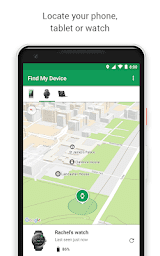
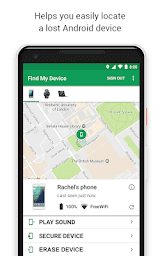
Google Find My Device employs cutting-edge GPS technology to pinpoint the precise location of your Android device. This feature ensures that you can easily locate your phone or tablet on a map, making retrieval a breeze.
Remote Device Locking and Data Wiping:
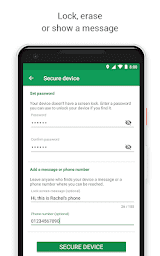
In the unfortunate event that your device is irretrievable, this feature allows you to remotely lock your device or even wipe its data. This ensures that your sensitive information remains secure, mitigating potential privacy risks.
Play Sound Feature:
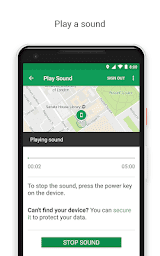
For those moments when your device is within earshot but elusively tucked away, the Play Sound feature proves invaluable. Activating this function triggers a loud ring, even if your device is on silent, aiding in swift recovery.
Battery Status and Network Connection:
Google Find My Device not only locates your device but also provides critical information about its battery status and network connection. This ensures that you can gauge how much time you have to retrieve your device and whether it’s reachable.
Highlights of Google Find My Device
 Cross-Platform Accessibility
One of the remarkable features of Google Find My Device is its cross-platform accessibility. Whether you’re using a smartphone, tablet, or computer, you can access the application through a web browser, making it convenient and versatile for users with various devices.
 Integration with Google Account
Seamlessly integrated with your Google Account, Find My Device taps into the robust infrastructure of Google services. This integration enhances the application’s reliability and efficiency, ensuring a cohesive user experience.
User-Friendly Interface
The application boasts an intuitive and user-friendly interface, making it accessible to users of all technical proficiencies. The straightforward design allows for quick navigation, ensuring that even those less accustomed to technology can easily harness its capabilities.
Tips
 Location Accuracy and Real-Time Tracking.
Google Find My Device offers precise location tracking for your Android devices, ensuring you can quickly locate them when needed. To maximize accuracy, ensure that location services are enabled on your device. Real-time tracking allows you to follow the device’s movements, providing up-to-the-minute information for a swift recovery.
Remote Device Management.
Take advantage of the remote management features provided by Google Find My Device. In case your device is lost or stolen, remotely lock your phone with a secure password or erase its data to prevent unauthorized access. This feature adds an extra layer of security and safeguards your personal information.
Pros & Cons
 1. Enables quick retrieval of lost devices, minimizing the risk of unauthorized access to personal information.
2. Allows users to lock and wipe their devices remotely.
3. The Play Sound feature assists in locating devices within earshot.
4. Provides real-time location updates, ensuring accurate tracking for efficient device recovery.
1. Enables quick retrieval of lost devices, minimizing the risk of unauthorized access to personal information.
2. Allows users to lock and wipe their devices remotely.
3. The Play Sound feature assists in locating devices within earshot.
4. Provides real-time location updates, ensuring accurate tracking for efficient device recovery.
 1. Requires an active internet connection for real-time tracking.
2. Exclusively designed for Android devices.
3. Real-time location tracking can drain the device’s battery.
4. The Play Sound feature may lead to false alarms in crowded or noisy environments.
1. Requires an active internet connection for real-time tracking.
2. Exclusively designed for Android devices.
3. Real-time location tracking can drain the device’s battery.
4. The Play Sound feature may lead to false alarms in crowded or noisy environments.
FAQ


Ratings
















