






 4.9
4.9


Southwest Airlines App Info


Introduction
Southwest Airlines launched the app to simplify your booking procedures and enable you to check in in advance without visiting the counter! The app offers you a one-stop solution for your travel, saving you time and informing you of more detailed flight information. Here, users can not only book, change, and cancel flights, but also check in directly on mobile phones. Get your digital boarding pass with the gate and seat information, and there is no need to rush to fetch your printed ticket even in a hurry. From now on, your flight-taking experience will be enjoyable and easy. Real-time flight status and travel alerts are available for users to check in case of sudden and unexpected changes. The app enables you to cope with emergencies with more preparation and confidence. The list of upcoming flights in chronological order makes you a more organized person and reminds you of each trip with details. The travel funds mechanism encourages you to use more of our services to gain more benefits as a member. With its multiple features, Southwest Airlines unloads your luggage of stress and enriches your trip with more fun and leisure.
Features
Book at Fingertip
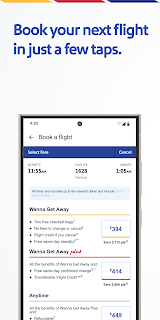
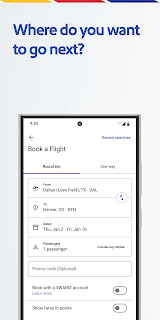
On Southwest Airlines, users can book flights, and reserve hotels and cars simply at their fingertips. No phone calls and complicated communications are needed with the app.
Check Information Easily
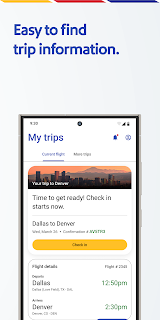
Users can directly check out the details of flight status, boarding gate, and seat, and receive instant alerts of flight changes and cancellations effortlessly.
Quick Access
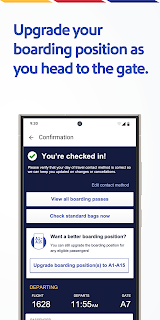
Southwest Airlines allows you to check in via your mobile phone without registered luggage. Get your mobile boarding pass and say goodbye to the long lines at the check-in counter.
All at One Glance
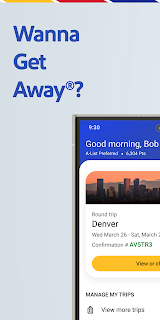
All your flight schedules will be listed out in order as a reminder for you to not miss. Tap on each of them to view more details, including the scheduled departure and arrival time, boarding gate and seat, etc.
Highlights
Simplified Procedures
Southwest Airlines enables users to book, change, cancel flights, and check in from their mobile phones.
Multiple Payment Methods
The app supports multiple payment options, including PayPal, debit and credit cards, Flex Pay, etc., enabling you to pay your ticket instantly.
Travel Benefits
Save your travel credits and accumulate your travel funds to get more benefits. Receiving gift cards is feasible when your flight is changed.
Tips
Rewards Overview
By checking Rapid Rewards, users can fully grasp their point balance and tier status.
Customized Notification
Set your personalized alerts to receive information about recent flights, promotion events, and reward campaigns.
Save Your Boarding Pass
For quicker access to your boarding pass, please save it to your Apple Wallet or Google Pay.
Pros & Cons
 Entertainment on Plane: The Inflight Entertainment Portal provides users with many choices of television channels, movies, and music for free.
Live Chat: When in trouble, users can contact the customer representatives using the live chat function at the Help Center. The service is available seven days a week during the working hours.
Pickup and Drop-off Service: Lyft, the partner of Southwest Airlines, has seamlessly integrated its service into the app and users can hail cars for airport pickup and drop-off.
Entertainment on Plane: The Inflight Entertainment Portal provides users with many choices of television channels, movies, and music for free.
Live Chat: When in trouble, users can contact the customer representatives using the live chat function at the Help Center. The service is available seven days a week during the working hours.
Pickup and Drop-off Service: Lyft, the partner of Southwest Airlines, has seamlessly integrated its service into the app and users can hail cars for airport pickup and drop-off.
 Problematic Boarding Pass: It takes users too many taps to finally check in and get the boarding pass.
Delayed Updates: The updates on flight status are not timely enough, which might lead to misunderstandings and late responses.
Problematic Boarding Pass: It takes users too many taps to finally check in and get the boarding pass.
Delayed Updates: The updates on flight status are not timely enough, which might lead to misunderstandings and late responses.
FAQ


Ratings















