






 4.3
4.3


Google Translate App Info


Introduction
In today’s globally connected society, the need for seamless communication across languages is paramount. Google Translate, a service provided by Google LLC, stands as a testament to the remarkable advancements in the realm of language processing and artificial intelligence. Launched in 2006, this versatile application has since become an indispensable tool for millions worldwide, bridging language barriers with its ability to translate text, speech, and even real-time conversation across over 100 languages. Users can effortlessly translate web pages, documents, or simply type in phrases to gain instant translations. With its intuitive interface, it caters to both individual and professional needs, from curious tourists navigating foreign cities to businesses seeking to communicate across global markets. Leveraging sophisticated machine learning algorithms, Google Translate continues to refine its accuracy, making global communication more accessible than ever before.
Features of Google Translate
 Text Translation:
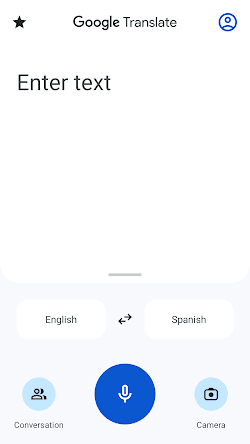
The primary feature of Google Translate is its ability to translate text from one language to another. Whether it’s a single word or a lengthy document, users can input the text they want to translate and select the desired target language. The application provides instant translations, allowing users to comprehend the content in their preferred language.
Voice Translation:
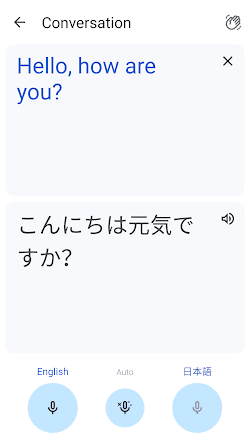
Another exceptional feature of Google Translate is its voice translation capability. This means you can speak a phrase or sentence in one language, and the application will convert it into the desired language. This feature is particularly helpful in real-time communication when speaking with someone who doesn’t share your language, allowing for seamless conversations.
Image Translation:
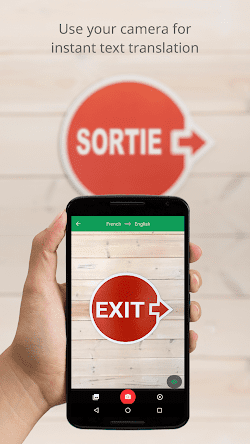
With the help of Google Translate, you can now translate text captured in images. By simply using your smartphone’s camera, you can scan signs, menus, or any other printed text and receive instant translations. This feature is incredibly convenient when traveling or exploring foreign-language texts.
Offline Translation:
Google Translate offers offline translation capabilities, allowing users to access translations even without an active internet connection. This feature comes in handy when traveling to areas with limited or no internet connectivity, ensuring that you can continue using the application without interruption.
Highlights of Google Translate
 Neural Machine Translation
Google employs NMT, which results in more accurate and contextually relevant translations compared to traditional algorithms.
 Integration with Other Apps
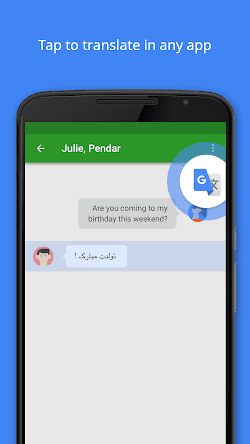
Google Translate can be integrated with various apps and web browsers, making the translation process embedded in user experiences.
Handwriting Input
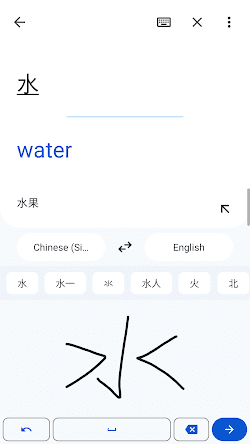
For languages with non-latin scripts or when users can’t type, Google Translate offers a handwriting option where users can draw characters or words.
Tips
 Proofread translations.
Although Google Translate offers impressive accuracy, it’s always advisable to proofread the translated text, especially for critical or important communications. Automatic translations may sometimes contain slight errors or may not fully capture specific nuances.
 Contextual understanding.
Remember that Google Translate works based on the context provided. Therefore, providing additional information or context may help improve the accuracy of translations. Consider the context in which the text is used to ensure the translation aligns appropriately.
Pros & Cons
 1. Available for costless, helping users globally with instant translations.
2. Supports over 100 languages, catering to diverse linguistic needs.
3. Seamlessly integrates with other Google services and apps.
4. Offers camera, handwriting, and voice input for varied use-cases.
1. Available for costless, helping users globally with instant translations.
2. Supports over 100 languages, catering to diverse linguistic needs.
3. Seamlessly integrates with other Google services and apps.
4. Offers camera, handwriting, and voice input for varied use-cases.
 1. Translations can lack nuance or context, leading to errors.
2. Struggles with idioms, proverbs, and culturally specific phrases.
3. Users may forgo learning languages, relying too much on technology.
4. User data might be collected, raising privacy issues.
1. Translations can lack nuance or context, leading to errors.
2. Struggles with idioms, proverbs, and culturally specific phrases.
3. Users may forgo learning languages, relying too much on technology.
4. User data might be collected, raising privacy issues.
FAQ


Ratings
















