






 4.3
4.3


YouTube Kids App Info


Introduction
YouTube Kids is a video streaming app created by Google LLC as a child-friendly version of the YouTube platform. Launched in 2015, YouTube Kids was designed to address parental concerns about inappropriate or objectionable content on YouTube that children could stumble upon. It provides a more contained environment tailored specifically for children under 13 years old.
The app offers a variety of kid-oriented shows plus educational videos that parents can allow their kids to browse freely. It uses algorithms and human reviewers to curate the available content. Parents have some control to customize the experience further by blocking videos or channels as needed. Overall, YouTube Kids aims to make it safer for kids to explore their interests and develop digital media literacy.
Features of YouTube Kids
 Content Filters:
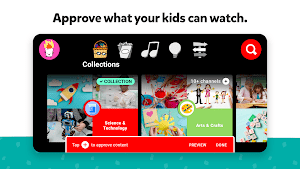
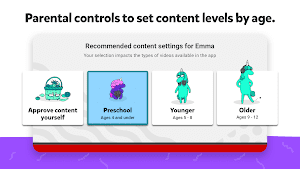
YouTube Kids incorporates robust content filters, ensuring that only age-appropriate videos make it to the platform. Parents can customize settings, giving them control over the type of content their children can access, fostering a secure viewing environment.
Timer and Usage Controls:
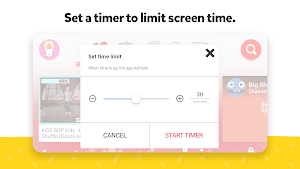
Empowering parents with control, YouTube Kids allows them to set time limits for their children’s screen time. This feature promotes healthy media consumption habits, striking a balance between entertainment and other activities.
Diverse Educational Content:
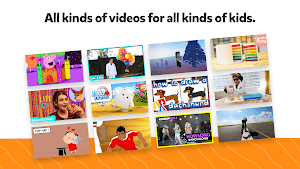
The platform boasts a wide array of educational videos, ranging from science experiments to language learning. YouTube Kids becomes a valuable resource for parents seeking to supplement their child’s education in an engaging and interactive manner.
User-Friendly Interface:
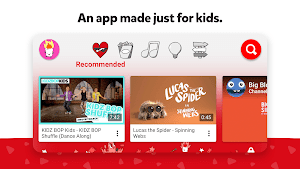
Designed with intuitive simplicity, YouTube Kids offers a user-friendly interface tailored to children’s needs. The easy navigation ensures that even the youngest users can independently explore and enjoy the platform safely.
Highlights of YouTube Kids
 Parental Dashboard
The inclusion of a comprehensive parental dashboard allows parents to monitor their child’s viewing history, providing insights into their interests and enabling informed decisions about content choices.
 Offline Mode
Recognizing the importance of flexibility, YouTube Kids enables users to download videos for offline viewing. This feature proves invaluable during travel or in areas with limited internet access, ensuring uninterrupted entertainment and education.
Customizable Content Recommendations
The application employs an intelligent recommendation system, tailoring content suggestions based on a child’s viewing history and preferences. This personalization enhances the overall user experience, offering a more curated and enjoyable journey through the platform.
Tips
 Fully Use Parental Controls for Safe Viewing.
YouTube Kids offers robust parental controls to ensure a safe viewing experience for children. Parents can set up a customized content experience by adjusting search settings, limiting screen time, and even disabling certain features. This allows parents to tailor the app to their child’s age and maturity level, providing age-appropriate content and ensuring a secure digital environment.
Stay Engaged with Regular Monitoring.
Regularly monitor your child’s activity within the app to stay informed about their preferences and interactions. YouTube Kids provides a ‘watch history’ feature, allowing parents to review the videos their child watched. This proactive monitoring helps ensure that the content aligns with your family values and allows for open communication about online habits, promoting a healthy and responsible use of technology.
Pros & Cons
 1. YouTube Kids serves as a treasure trove of educational content.
2. Robust parental controls allow parents to curate their child’s experience.
3. The platform offers a diverse range of entertaining content, from animated series to sing-alongs.
4. With its user-friendly interface, YouTube Kids is easily accessible.
5. The option to download content for offline viewing enhances flexibility.
1. YouTube Kids serves as a treasure trove of educational content.
2. Robust parental controls allow parents to curate their child’s experience.
3. The platform offers a diverse range of entertaining content, from animated series to sing-alongs.
4. With its user-friendly interface, YouTube Kids is easily accessible.
5. The option to download content for offline viewing enhances flexibility.
 1. While the platform aims to be ad-free, some sponsored content may slip through.
2. Despite robust filters, the risk of occasional inappropriate content slipping through exists.
3. YouTube Kids relies on an internet connection, limiting its usability in areas with poor connectivity.
4. The absence of real-time monitoring features may leave parents unaware of their child’s current viewing habits.
1. While the platform aims to be ad-free, some sponsored content may slip through.
2. Despite robust filters, the risk of occasional inappropriate content slipping through exists.
3. YouTube Kids relies on an internet connection, limiting its usability in areas with poor connectivity.
4. The absence of real-time monitoring features may leave parents unaware of their child’s current viewing habits.
FAQ


Ratings
















