





 4.1
4.1


Maps Driving Directions App Info


Introduction
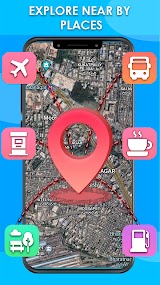
Maps Driving Directions is a multifunctional navigation for users to explore the world. The app caters to the needs of a wide range of people, varying from users on foot, by bike, on the train, or driving cars. It directs you to the desired destination with details, including the distance, the time duration, traffic conditions, and the shortest route. Maps Driving Directions enable users to explore the town by learning about the local restaurants, gas stations, cafes, parks, etc. When waiting for the train or bus, the app shows the accurate estimated arrival and departure time, ensuring users a trustworthy travel experience. It supports navigation both online and offline. Fulfill your curiosity by confirming the location of your current place on layers of maps in modes of hybrid, terrain, and satellite, checking out the specific statistics of the latitude and longitude to gain new understandings of your home. To enhance a safer and more convenient travel experience, Maps Driving Directions also updates the weather in real time. With the app, users can travel safely and sound with full confidence and high efficiency.
Features
Accurate and Efficient Navigation
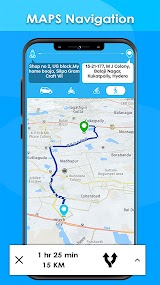
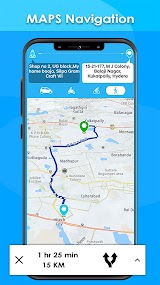
Featuring powerful navigation technology, Maps Driving Directions provides users with the most accurate information about the route, time on the road, and distance. Moreover, it automatically recommends to users the easiest route to save time and energy.
Multiple Map Modes
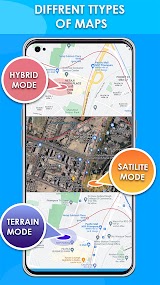
Apart from the commonly used hybrid mode of maps, the app also supports satellite and terrain views, offering users a different impression of the location.
Avoid Traffic Jam
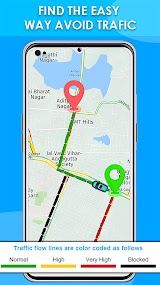
Maps Driving Directions marks routes with various extend of traffic condition in different colors for differentiation for users to avoid the traffic jam and get to the destination faster.
Weather Forecast
The real-time weather updates and forecasts inform users of the weather within 15 days, which is a good reference for planning future trips.
Highlights
Online and Offline Maps
Maps Driving Directions allows users to navigate both online and offline. Even without an internet connection, users can find the place easily.
Share Your Location
Users can pinpoint the current location and share it with their friends on various occasions. Be it on social media content sharing, or messaging before the personal meet-up.
Detailed Maps
The app features regional maps with detailed information about the local businesses and public places, as well as the location address.
Tips
Pinpoint the Location
Users can choose the location by directly dragging the location arrow to the place on the map instead of typing the full name.
Check Traffic in Colors
The extent of gravity of the traffic jam is shown in different colors. Green means normal, yellow stands for high, red refers to very high, and black indicates the road is completely blocked.
Satellite Pictures
Check out the photos of your home and places that interest you are taken by satellite by switching to the satellite mode.
Pros & Cons
 Powerful Search: By simply typing the name of the place you are looking for, Maps Driving Directions will show you the detailed addresses and information about the place, together with the most comprehensive solutions for navigation.
Real-Time Navigation: With real-time navigation, the app will adjust the route for you depending on the real-time traffic situation on the road, enabling you to arrive at your destination as immediately as possible.
Traffic and Weather Updates: Users can receive updates on real-time traffic and weather to have a secure and fast driving experience.
Powerful Search: By simply typing the name of the place you are looking for, Maps Driving Directions will show you the detailed addresses and information about the place, together with the most comprehensive solutions for navigation.
Real-Time Navigation: With real-time navigation, the app will adjust the route for you depending on the real-time traffic situation on the road, enabling you to arrive at your destination as immediately as possible.
Traffic and Weather Updates: Users can receive updates on real-time traffic and weather to have a secure and fast driving experience.
 Ads-Ridden Interface: The pages of the app are filled with ads, interfering with users’ experience.
Cumbersome Offline Maps: Although the maps are available offline, saving them to the local storage room is quite time-consuming and takes a lot of space.
Ads-Ridden Interface: The pages of the app are filled with ads, interfering with users’ experience.
Cumbersome Offline Maps: Although the maps are available offline, saving them to the local storage room is quite time-consuming and takes a lot of space.
FAQ


Ratings
















