






 4.5
4.5


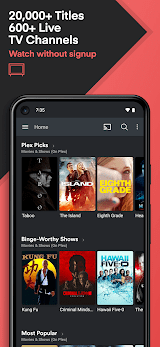



Plex: Stream Movies & TV App Info


Introduction
In the dynamic landscape of digital entertainment, Plex: Stream Movies & TV stands as a beacon of innovation, seamlessly integrating media streaming, organization, and sharing capabilities into a single platform. Developed by Plex, Inc., this application has redefined the way users access and enjoy their favorite movies and TV shows.
Plex: Stream Movies & TV emerges as a multifaceted media platform, transcending conventional boundaries to provide users with an unparalleled streaming experience. At its core, Plex is not merely a streaming service but a versatile ecosystem that organizes and curates your media library, transforming any device into a personalized entertainment hub. Whether you’re a cinephile or a TV series enthusiast, Plex promises a user-friendly interface coupled with a robust feature set, ensuring that your media consumption is elevated to new heights.
Features of Plex: Stream Movies & TV
 Unified Media Library:
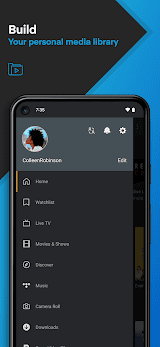
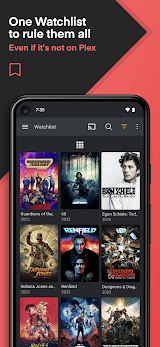
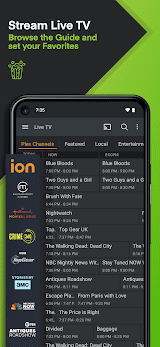
Plex consolidates your diverse media collection, seamlessly integrating movies, TV shows, music, and photos into a single, visually appealing interface. This unified library ensures easy access to your entire digital content repertoire, promoting a hassle-free streaming experience.
 Cross-Platform Streaming:
With Plex, the limitations of device compatibility vanish. The application supports a myriad of platforms, from smart TVs to mobile devices and desktops. This cross-platform compatibility guarantees that your entertainment is accessible anytime, anywhere.
Personalized Recommendations:
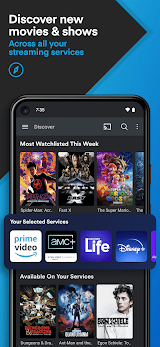
Leveraging advanced algorithms, Plex analyzes your viewing habits and preferences to deliver tailor-made recommendations. This feature not only helps you discover new content but also enhances your overall entertainment experience by presenting options aligned with your tastes.
Offline Viewing:
Plex caters to the on-the-go lifestyle by enabling offline viewing. Users can download their favorite movies and TV shows, allowing for uninterrupted entertainment, even in areas with limited or no internet connectivity.
Highlights of Plex: Stream Movies & TV
 Intuitive User Interface
Plex boasts a visually appealing and intuitive user interface that simplifies navigation and enhances user engagement. The aesthetically pleasing design ensures that users can effortlessly browse through their media library and access desired content with ease.
 Parental Controls
Recognizing the diverse audience it serves, Plex incorporates robust parental controls. This feature allows parents to regulate content access for younger viewers, ensuring a secure and age-appropriate entertainment environment.
Comprehensive Media Management
Plex goes beyond streaming by providing robust media management tools. Users can organize their libraries, edit metadata, and even add custom artwork, fostering a sense of ownership and control over their digital collection.
Tips
 Optimize Server Settings for Smooth Streaming.
Plex’s performance relies heavily on your server setup. Configure your server settings to match your network’s capabilities, ensuring a seamless streaming experience. Adjust the transcoding settings to accommodate various devices and network conditions. Regularly check for software updates and keep your server hardware up to date to leverage the latest optimizations and improvements offered by Plex.
 Customize User Profiles and Parental Controls.
Enhance the user experience by setting up individual user profiles within Plex. This allows each user to maintain their watch history, preferences, and recommendations. If your Plex server caters to a diverse audience, implement robust parental controls to restrict content based on ratings. Tailor the viewing experience for different household members, providing a safe and enjoyable environment for users of all ages. Regularly review and update these settings to adapt to changing preferences and circumstances.
Pros & Cons
 1. Plex’s compatibility with a wide range of devices ensures that users can seamlessly transition between platforms.
2. The consolidated library simplifies content discovery.
3. Plex’s algorithmic approach to recommendations refines content discovery.
4. The option to download content for offline viewing caters to users with sporadic internet access.
1. Plex’s compatibility with a wide range of devices ensures that users can seamlessly transition between platforms.
2. The consolidated library simplifies content discovery.
3. Plex’s algorithmic approach to recommendations refines content discovery.
4. The option to download content for offline viewing caters to users with sporadic internet access.
 1. While the basic Plex service is costless, advanced features require a subscription.
2. The extensive feature set and customization options may pose a learning curve for new users.
3. To maximize Plex’s potential, users must maintain a dedicated server.
4. Its ability to introduce users to entirely new genres may be limited compared to its peers.
1. While the basic Plex service is costless, advanced features require a subscription.
2. The extensive feature set and customization options may pose a learning curve for new users.
3. To maximize Plex’s potential, users must maintain a dedicated server.
4. Its ability to introduce users to entirely new genres may be limited compared to its peers.
FAQ


Ratings
















