





 4.7
4.7
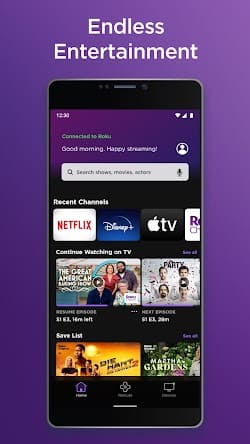
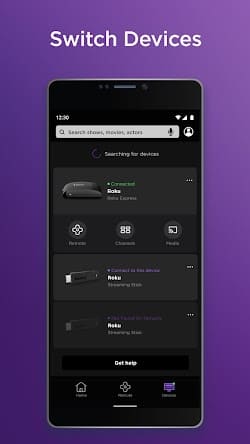
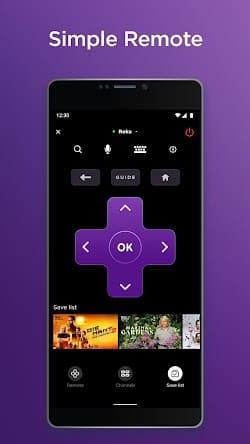


The Roku App (Official) App Info


Introduction
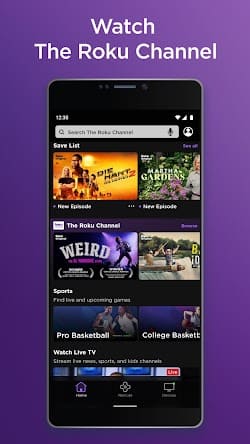
The Roku App (Official) is a sophisticated digital tool developed by Roku, Inc. & its affiliates, designed to enhance the user experience for Roku device owners. This app seamlessly integrates with Roku’s range of streaming devices, allowing users to transform their smartphones or tablets into a powerful remote control. Besides the fundamental feature of navigating the Roku interface, the application also supports voice commands, enabling users to search for shows, movies, or even launch apps using just their voice. Moreover, with its private listening mode, users can plug in headphones to their mobile device to watch without disturbing others. Additionally, the Roku App offers a selection of mobile-specific features such as casting personal media, browsing the Roku Channel Store, and managing multiple Roku devices. The Roku App thus stands as a testament to the company’s commitment to providing a holistic and innovative streaming experience.
Features of The Roku App (Official)
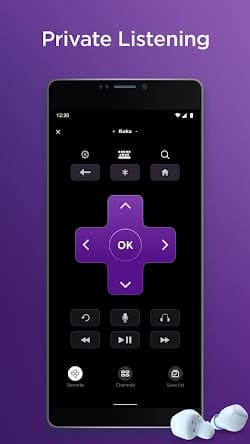
 Remote Control:
The Roku App (Official) transforms your smartphone into a powerful remote control. Enjoy the convenience of navigating Roku’s intuitive interface, browsing channels, and controlling playback with just a few taps on your phone’s screen.
 Private Listening:
The app allows you to listen to your favorite content privately by connecting your headphones to your mobile device. No more disturbing others around you while enjoying your favorite TV shows or movies.
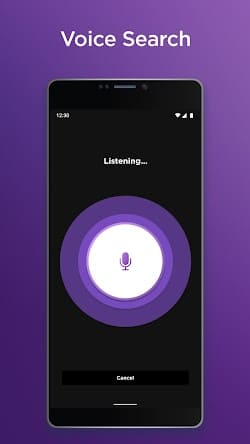
Voice Search:
With the voice search feature, you can easily find your desired content by simply speaking your query into the app. Say goodbye to tedious typing and quickly discover movies, TV shows, actors, and more.
Channel Customization:
The Roku App (Official) enables effortless channel customization. You can rearrange icons, delete unwanted channels, and even add channels directly from your mobile device, giving you complete control over your streaming lineup.
Highlights of The Roku App (Official)
 Universal Search
The Roku App’s universal search feature helps you find content across multiple streaming channels. Simply enter the name of a movie, show, or actor, and the app will display available options from various sources, making it easy to compare and find the best streaming option.
 Roku Feed
Stay up to date with your favorite shows and movies using the Roku Feed. Follow specific titles, actors, or directors, and receive notifications when new content is released or when prices drop, ensuring you never miss out on the latest entertainment.
Screen Mirroring
The Roku App (Official) allows you to mirror your mobile device’s screen on your TV, making it ideal for sharing photos, videos, or presentations with friends and family on the big screen.
Tips
 Enjoy the Extreme Convenience Brought by Voice Search.
Bypass the tedium of typing out search queries by utilizing the voice search functionality. Simply tap the microphone icon in the app and voice out your desired show, movie, actor, or director. This not only speeds up the process but also minimizes the chances of misspelling, giving you more time to enjoy your content.
Experience the Big Screen View with Photo or Video Casting!
Showcase your personal media on the big screen without additional hardware. The Roku App lets you cast photos and videos stored on your mobile device directly to your Roku player or TV. It’s great for sharing vacation memories, home videos, or simply turning your TV into a digital photo frame for an event.
Pros & Cons
 1. Merge multiple functionalities into a single device, reducing the need for multiple remotes.
2. No additional purchase necessary as it leverages your existing mobile device.
3. Ensures the app stays updated with the latest features and bug fixes.
4. Intuitive design, ensuring easy navigation for users of all ages.
5. Tailored to accommodate users with special needs, enhancing inclusivity.
1. Merge multiple functionalities into a single device, reducing the need for multiple remotes.
2. No additional purchase necessary as it leverages your existing mobile device.
3. Ensures the app stays updated with the latest features and bug fixes.
4. Intuitive design, ensuring easy navigation for users of all ages.
5. Tailored to accommodate users with special needs, enhancing inclusivity.
 1. If your phone’s battery dies, you lose access.
2. Sometimes might experience lags or disconnects, especially on unstable networks.
3. New users might require time to familiarize themselves.
4. Continuous use might lead to high data consumption on limited data plans.
1. If your phone’s battery dies, you lose access.
2. Sometimes might experience lags or disconnects, especially on unstable networks.
3. New users might require time to familiarize themselves.
4. Continuous use might lead to high data consumption on limited data plans.
FAQ


Ratings
















