






 4.1
4.1
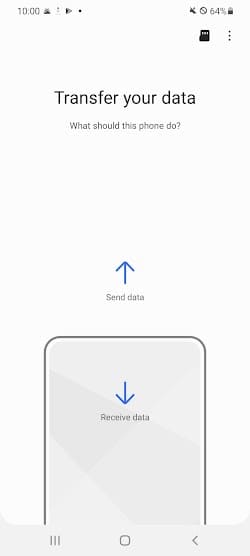


Samsung Smart Switch Mobile App Info


Introduction
Samsung Smart Switch Mobile, developed by the renowned Samsung Electronics Co., Ltd., is an innovative application that ensures a seamless transition for users upgrading to a new Samsung device. Recognizing the importance of personal data, this application facilitates the effortless transfer of contacts, photos, messages, and numerous other types of content from an old device to a new Samsung smartphone or tablet. Whether users are migrating from an Android device, an iOS device, or even a Windows phone, Samsung Smart Switch Mobile ensures that cherished memories and vital information are not lost in the transition. Furthermore, its user-friendly interface and robust compatibility features make the process uncomplicated and swift. In an era where personal data is pivotal, Samsung Smart Switch Mobile stands as a testament to Samsung’s commitment to providing users with tools that enhance their digital experience.
Features of Samsung Smart Switch Mobile
 Broad Compatibility:
This application is not restricted to Samsung-to-Samsung transfers. It supports devices from different manufacturers, ensuring maximum flexibility for users looking to migrate their data to a Samsung device.
 Multiple Data Types:
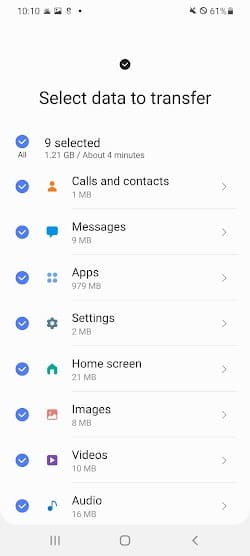
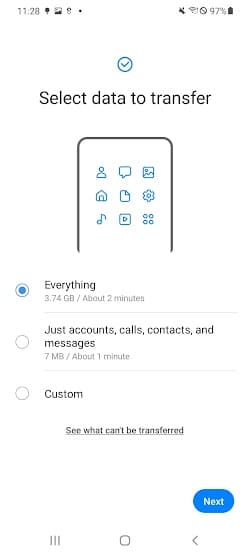
Another notable feature is the ability to transfer not just your personal data, but also the settings, apps, and even the layout of your home screen. This means that your new Samsung device will feel familiar and personalized right from the start, allowing you to jump right into using your new device without missing a beat.
Wired and Wireless Transfer:
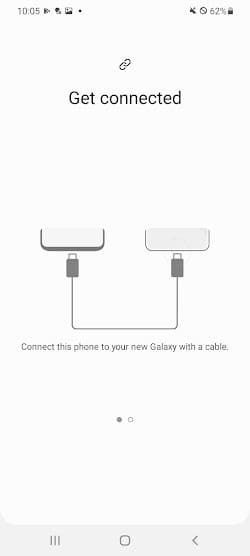
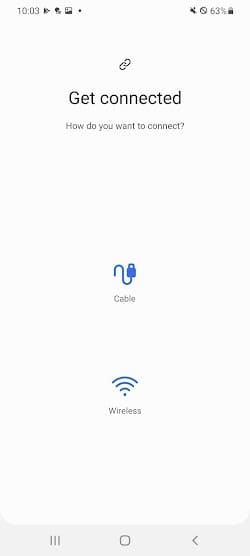
Additionally, Samsung Smart Switch Mobile offers wireless transfers, so you don’t need to worry about using cables or having a computer nearby. You can easily transfer your data using Wi-Fi Direct, which ensures a fast and secure connection between your old and new devices.
Backup and Restoration:
Furthermore, this application provides a backup and restore feature, allowing you to easily create backups of your important data or restore it to a new device. This ensures that your data is always protected and readily available, even if you encounter any unexpected issues or need to replace your device.
Highlights of Samsung Smart Switch Mobile
 User-Friendly Interface
One significant aspect of Samsung Smart Switch Mobile is its user-friendly interface. The application is designed with simplicity in mind, making it easy for anyone to navigate and use, regardless of their technical expertise.
 Rapid Transfer Speeds
Another highlight is the speed of data transfer. This application leverages the latest technology to ensure that your data is transferred quickly and efficiently, saving you valuable time and minimizing any potential downtime during the transition to your new device.
Automatic App Suggestions
If certain apps from your previous device aren’t available on the new one, Smart Switch suggests alternatives from the Play Store.
Tips
 Make Sure the Supported Devices and Data Types.
Before you initiate a transfer, ensure both your devices are compatible. While Smart Switch is designed primarily for Samsung devices, it also supports many other Android and iOS devices. However, the types and amounts of data that can be transferred might vary. This includes contacts, photos, music, notes, and more. Check the official website or application details for a comprehensive list of supported data and devices.
 Ensure Sufficient Battery Life.
Data transfer can be power-consuming. To avoid any interruption during the process, ensure both your source and destination devices have ample battery, preferably above 50%. If you are doing a wireless transfer, the battery drain can be even faster, so keeping your devices plugged in might be a wise precaution.
Pros & Cons
 1. Eliminates manual transfer hassles, speeding up the device switching process.
2. No extra charges or in-app purchases, ensuring accessible data migration.
3. Supports data download from cloud storage.
4. Regularly updated to support the latest devices and software.
5. Developed by Samsung, a trusted brand in technology.
1. Eliminates manual transfer hassles, speeding up the device switching process.
2. No extra charges or in-app purchases, ensuring accessible data migration.
3. Supports data download from cloud storage.
4. Regularly updated to support the latest devices and software.
5. Developed by Samsung, a trusted brand in technology.
 1. Primarily designed for Samsung devices, which may limit certain functionalities for others.
2. Some data types or apps might not transfer perfectly.
3. Occasional glitches with wireless transfers.
4. Massive data transfers might slow down the process.
5. Older device models might face limitations.
1. Primarily designed for Samsung devices, which may limit certain functionalities for others.
2. Some data types or apps might not transfer perfectly.
3. Occasional glitches with wireless transfers.
4. Massive data transfers might slow down the process.
5. Older device models might face limitations.
FAQ


Ratings
















