






 3.3
3.3


Ticketmaster - Buy, Sell Tickets App Info


Introduction
Ticketmaster is a popular mobile application that allows users to buy and sell tickets for various live events such as concerts, sports games, theater shows, and more. With Ticketmaster, users can easily search for upcoming events, view seat maps, securely purchase official tickets, and even resell tickets they can no longer use. The app provides a convenient way for fans to get tickets to the events they want to attend. Ticketmaster also aims to protect users from fraud by only selling verified, authentic tickets directly from event organizers and venues. Overall, Ticketmaster is a useful app for finding and purchasing tickets, though some users complain about high fees.
Features of Ticketmaster-Buy, Sell Tickets
 Extensive Event Catalog:
Ticketmaster - Buy, Sell Tickets boasts an expansive catalog of events, spanning music concerts, sports fixtures, and cultural exhibitions. Whether you are a fan of rock, soccer, or classical art, the app offers a comprehensive selection of options for your entertainment preferences.
 Interactive Seating Charts:
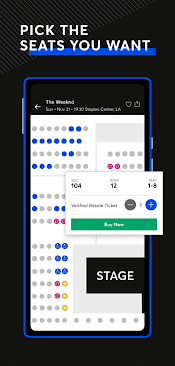
This feature allows users to browse venues, assess available seats, and make informed choices about their ticket purchase. You can virtually explore the view from each seat, ensuring that you get the best vantage point for your chosen event.
Resale Marketplace:
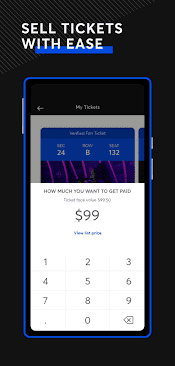
Ticketmaster’s resale marketplace enables users to buy and sell tickets securely. This feature facilitates last-minute ticket acquisitions and ensures that no event is entirely off-limits, even when tickets are officially sold out.
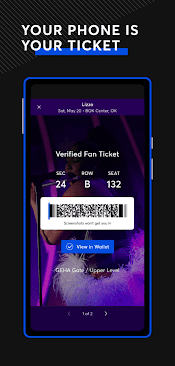
Mobile Ticketing
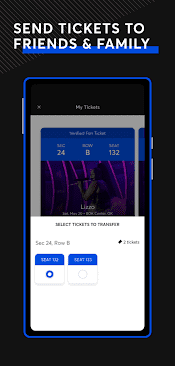
Say goodbye to paper tickets with the convenience of mobile ticketing. Users can easily access their tickets, transfer them to friends and family, and enter events with a simple scan of their smartphone, reducing the hassle of carrying physical tickets.
Highlights of Ticketmaster-Buy, Sell Tickets
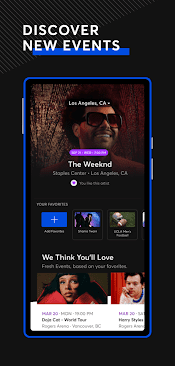
 Personalized Event Recommendations
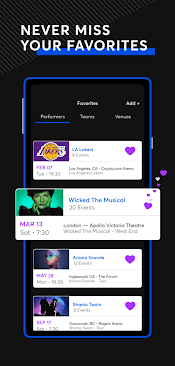
The app employs advanced algorithms to recommend events based on your preferences and browsing history, helping you discover new experiences you might love.
In-App Seat Upgrades
Once you have secured your entry, the app can also help you enhance your experience by offering seat upgrade options, allowing you to get closer to the action or enjoy a better view.
Notifications and Alerts
Ticketmaster - Buy, Sell Tickets keeps you in the loop with event announcements, on-sale notifications, and reminders, ensuring you never miss out on a hot ticket.
Tips
 Be Mindful of Ticket Release Times.
Major events often release tickets at specific times, and they can sell out within minutes. To increase your chances of getting the tickets you want, set a reminder for the ticket release time and be prepared to access the Ticketmaster app a few minutes in advance. This will help you avoid delays and ensure you are ready to secure your tickets as soon as they become available.
Securely Manage and Transfer Tickets.
The Ticketmaster app offers a convenient way to manage and transfer your tickets to others. If you can’t attend an event, consider transferring the tickets to a friend or family member directly through the app. Ensure they have a Ticketmaster account to facilitate the transfer. This helps avoid fraud and ensures the tickets go to someone you trust.
Pros & Cons
 1. The app provides a one-stop destination for all your ticketing needs, streamlining the ticket purchasing process.
2. Ticketmaster’s trusted reputation ensures secure transactions and genuine tickets.
3. With mobile ticketing and in-app transfers, you can easily manage your tickets on the go.
4. The app’s personalized recommendations broaden your horizons by suggesting events that align with your interests.
5. The resale feature accommodates flexibility, allowing you to buy or sell tickets.
1. The app provides a one-stop destination for all your ticketing needs, streamlining the ticket purchasing process.
2. Ticketmaster’s trusted reputation ensures secure transactions and genuine tickets.
3. With mobile ticketing and in-app transfers, you can easily manage your tickets on the go.
4. The app’s personalized recommendations broaden your horizons by suggesting events that align with your interests.
5. The resale feature accommodates flexibility, allowing you to buy or sell tickets.
 1. Ticketmaster is notorious for its service fees, which can significantly increase the overall ticket price.
2. Popular events can sell out within minutes.
3. Despite efforts to curb scalping, some tickets end up on the resale marketplace at inflated prices.
1. Ticketmaster is notorious for its service fees, which can significantly increase the overall ticket price.
2. Popular events can sell out within minutes.
3. Despite efforts to curb scalping, some tickets end up on the resale marketplace at inflated prices.
FAQ


Ratings
















