






 4.4
4.4





BOTIM App Info


Introduction
Botim is a widely used video and voice calling app that provides users with a convenient and fast way to communicate with others in real time. Whether it's with friends, family or colleagues, Botim meets your communication needs. It has many unique features and functions, so that users can enjoy a high quality call experience. Botim is a powerful video and voice calling app that is popular for its high-quality calling experience and cross-platform compatibility. It provides users with a convenient, secure and affordable way to communicate, allowing you to stay close to friends and family wherever you are. Whether you are a personal user or a business user, Botim can meet your call needs and bring more communication convenience.
Features of Botim
 Video and Voice Calls
Botim allows users to make high-definition video and voice calls, maintaining clear sound and image quality no matter where they are calling anyone in the world.
 Encrypted Communication
Botim uses the most advanced encryption technology to ensure that the content of your calls is protected and you can share private information with confidence.
Cross-platform Support
Botim is available for multiple operating systems and devices, including iOS, Android, Windows, and Mac, and you can use it to make calls anytime, anywhere.
Group Calls
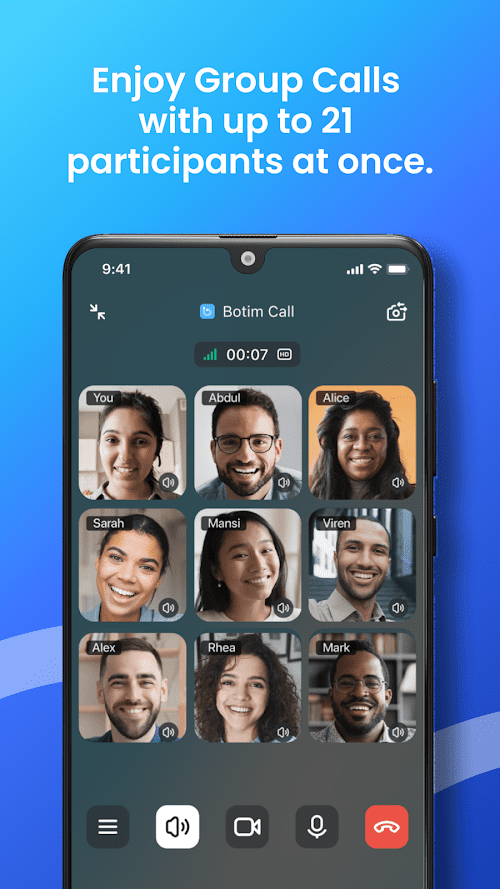
In addition to one-on-one calls, Botim also supports group calls, allowing users to talk to multiple people at the same time, facilitating communication and collaboration.
Real-time Message
Botim also provides real-time message function you can send messages with the person you are talking to, share documents, pictures and videos, and facilitate remote work and study.
Highlights of Botim
 High Quality Call
Botim is known for its excellent sound and video quality, and users can enjoy a clear and smooth call experience.
 Free International Calls
With Botim, you can call Botim users worldwide for free, no matter where they are.
Low Network Transmission Costs
Botim uses a data connection to make calls, which saves you money compared to traditional phone services.
Tips
 Download and install
Open the app store or official website, search for and download the Botim app, then follow the prompts to install it.
 Registration and login
After opening the app, enter your mobile number as instructed and verify, then set a password to complete the registration and login process.
Add a contact
Search for the contact you want to add by mobile phone number or user name and send a friend request.
Start the call
Find the contact you want to call, click on the profile picture or name, and then select the video or voice call option to start the call.
Real-time message
On the call interface, you can also use the real-time message function to text chat with your contacts, share files and pictures.
Pros & Cons
 Easy to use: Botim's user interface is simple and clear, and the functions are simple and clear, whether you are a beginner or an experienced user, you can easily get started.
Cross-platform compatibility: Botim supports multiple operating systems and devices, making it easy to make calls whether you're using a phone, tablet, or computer.
Security and privacy protection: Botim uses advanced encryption technology to protect the security of your call content and personal information.
High quality calling: Botim offers a high quality audio and video calling experience, ensuring you can stay connected with friends and family.
Easy to use: Botim's user interface is simple and clear, and the functions are simple and clear, whether you are a beginner or an experienced user, you can easily get started.
Cross-platform compatibility: Botim supports multiple operating systems and devices, making it easy to make calls whether you're using a phone, tablet, or computer.
Security and privacy protection: Botim uses advanced encryption technology to protect the security of your call content and personal information.
High quality calling: Botim offers a high quality audio and video calling experience, ensuring you can stay connected with friends and family.
 There is network dependence: Botim needs a good network connection to provide stable call quality, if the network signal is not good, it may affect the quality of the call.
Installation and registration required: In order to make calls using Botim, users need to install the application on their device and complete the registration process.
There is network dependence: Botim needs a good network connection to provide stable call quality, if the network signal is not good, it may affect the quality of the call.
Installation and registration required: In order to make calls using Botim, users need to install the application on their device and complete the registration process.
FAQ


Ratings
















