





 4.3
4.3

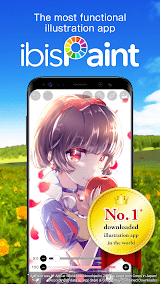


ibis Paint X App Info


Introduction
Ibis Paint X, developed by ibis inc., stands as a versatile and user-friendly digital art application that caters to the creative needs of both amateur and professional artists. Available on various platforms, including iOS and Android, this feature-rich app empowers users with a plethora of artistic tools, making digital painting and illustration an intuitive and enjoyable experience. With a vast array of brushes, filters, and customizable features, ibis Paint X enables artists to bring their visions to life with precision and creativity. The app supports high-resolution canvases and offers a seamless interface for sketching, coloring, and refining artwork. Additionally, ibis Paint X boasts a robust community platform, fostering collaboration and inspiration among artists worldwide. Whether you’re a budding artist or an experienced creator, ibis Paint X provides a dynamic digital canvas for unleashing your imagination and crafting visually stunning digital masterpieces.
Features of ibis Paint X
 Powerful Brush Engine:
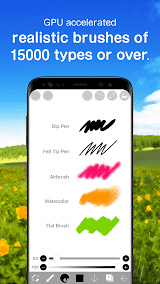
With over 15,000 brushes, ibis Paint X provides a diverse range of tools, including pens, pencils, and airbrushes. The advanced brush engine ensures precise strokes, allowing users to recreate traditional art techniques digitally.
 Layers and Blending Modes:
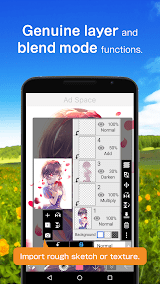
Offering up to 27 blending modes, ibis Paint X allows artists to experiment with various layer effects. This feature facilitates the creation of complex and visually stunning artworks, adding depth and richness to the digital canvas.
Time-Lapse Recording:
The app automatically records the entire creation process, enabling artists to showcase their work in a captivating time-lapse video. This not only serves as a valuable learning tool but also allows users to share their creative journey with others.
Social Platform Integration:
ibis Paint X fosters a vibrant artistic community by seamlessly integrating with social platforms. Users can share their creations, exchange ideas, and participate in challenges, fostering a collaborative environment for aspiring and seasoned artists alike.
Highlights of ibis Paint X
 Versatility for All Skill Levels
Whether you’re a beginner exploring digital art or an experienced artist seeking advanced tools, ibis Paint X caters to a wide range of skill levels. Its user-friendly interface ensures accessibility without compromising on features.
 Realistic Textures and Effects
The app’s attention to detail extends to its realistic textures and effects, allowing artists to mimic traditional art mediums with precision. This feature adds an authentic touch to digital creations, enhancing the overall visual appeal.
Cross-Platform Compatibility
ibis Paint X seamlessly operates across various platforms, including iOS, Android, and Windows. This cross-platform compatibility ensures that artists can create, edit, and share their work effortlessly, regardless of their device preference.
Tips
 Leverage Layer Management to Enhance Efficiency.
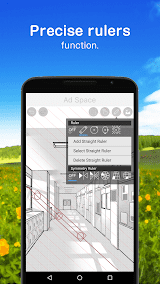
To enhance your digital artwork in ibis Paint X, make the most of its advanced layer management features. Utilize layer groups to organize and streamline your workflow. This allows for easier editing and manipulation of specific elements within your composition. By taking advantage of layer opacity and blending modes, you can achieve complex and nuanced effects, giving your artwork depth and dimension. Experimenting with these features will empower you to create professional-looking illustrations with greater ease and precision.
Brush Customization for Personal Style.
Unleash your creativity by exploring the extensive brush customization options in ibis Paint X. Tailor brushes to suit your artistic style and project requirements. Adjust parameters such as size, opacity, and blending modes to achieve the desired effects. Save your custom brushes for future use, fostering a consistent and personalized artistic approach. Whether you’re into detailed illustrations or expressive strokes, mastering brush customization will enable you to create unique and captivating digital artworks.
Pros & Cons
 1. The vast array of brushes caters to diverse artistic styles, offering flexibility in creating digital art.
2. The integrated social platform encourages artists to connect, share, and learn from one another.
3. The user-friendly interface ensures a smooth learning curve.
4. The automatic time-lapse recording feature serves as a creative tool and allows artists to analyze techniques.
1. The vast array of brushes caters to diverse artistic styles, offering flexibility in creating digital art.
2. The integrated social platform encourages artists to connect, share, and learn from one another.
3. The user-friendly interface ensures a smooth learning curve.
4. The automatic time-lapse recording feature serves as a creative tool and allows artists to analyze techniques.
 1. While the app offers a costless version, some advanced features require a subscription.
2. Beginners may find the multitude of features initially overwhelming, requiring time to explore and master.
3. Running the app on older devices may lead to performance issues, as it can be resource-intensive.
4. The app primarily focuses on raster-based art, lacking robust support for vector graphics.
5. Some users may find the process less intuitive compared to other graphic design applications.
1. While the app offers a costless version, some advanced features require a subscription.
2. Beginners may find the multitude of features initially overwhelming, requiring time to explore and master.
3. Running the app on older devices may lead to performance issues, as it can be resource-intensive.
4. The app primarily focuses on raster-based art, lacking robust support for vector graphics.
5. Some users may find the process less intuitive compared to other graphic design applications.
FAQ


Ratings
















